概述
在 Rust 中,生命周期(Lifetime)是保证内存安全的核心机制之一。它解决了其他系统编程语言中常见的悬垂引用(Dangling Reference)问题,通过编译期检查确保所有引用都是有效的。与垃圾回收机制不同,生命周期完全在编译阶段工作,不会带来任何运行时开销。
核心概念
什么是生命周期?
- 引用的有效范围:生命周期是指引用保持有效的代码区域
- 编译期检查:生命周期不影响程序运行时行为,仅用于编译期验证
- 防止悬垂引用:确保引用不会指向已释放的内存
- 显式标注:当编译器无法推断时,需要显式标注生命周期
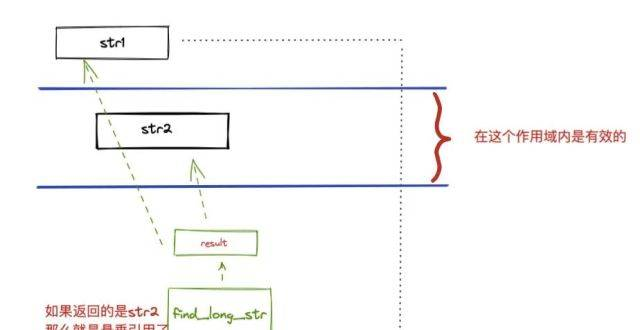
为什么需要生命周期?
考虑以下 C++ 代码中的悬垂引用问题:
int* get_dangling_reference() {
    int x = 5;
    return &x; // 危险!返回局部变量的地址
}

int main() {
    int* dangling = get_dangling_reference();
    // 使用 dangling 会导致未定义行为
}
Rust 通过生命周期机制在编译期就杜绝了此类问题:
fn get_dangling_reference() -> &i32 {
    let x = 5;
    &x // 编译错误:`x` does not live long enough
}
生命周期与所有权的关系
| 所有权 | 生命周期 | 协同工作 |
|---|---|---|
| 决定了值何时被创建和销毁 | 决定了引用何时有效 | 生命周期依赖于所有权系统,确保引用不会超过其指向值的生命周期 |
生命周期标注语法
生命周期参数
生命周期参数使用 'a 形式表示,通常以小写字母开头:
// 单生命周期参数
fn example<'a>(x: &'a i32) {}

// 多生命周期参数
fn example<'a, 'b>(x: &'a i32, y: &'b str) {}
标注位置
生命周期标注可以出现在函数参数、返回值、结构体和 trait 中:
// 函数参数和返回值标注
fn longest<'a>(x: &'a str, y: &'a str) -> &'a str {
    if x.len() > y.len() { x } else { y }
}

// 结构体标注
struct RefWrapper<'a> {
    data: &'a i32,
}

// Trait 标注
trait MyTrait<'a> {
    fn get_data(&self) -> &'a i32;
}
生命周期省略规则
Rust 编译器可以自动推断某些常见情况下的生命周期,称为”生命周期省略”(Lifetime Elision):
- 每个引用参数获得独立生命周期
// 编译器自动推断为 fn foo<'a, 'b>(x: &'a i32, y: &'b str)
fn foo(x: &i32, y: &str) {}
- 如果只有一个输入生命周期参数,它被赋予所有输出生命周期参数
// 编译器自动推断为 fn bar<'a>(x: &'a str) -> &'a str
fn bar(x: &str) -> &str { x }
- 方法中,
&self或&mut self的生命周期被赋予所有输出生命周期参数
struct MyStruct {
    data: String,
}

impl MyStruct {
    // 编译器自动推断为 fn get_data<'a>(&'a self) -> &'a str
    fn get_data(&self) -> &str {
        &self.data
    }
}
函数与方法中的生命周期
函数参数生命周期
当函数有多个引用参数时,需要明确它们的生命周期关系:
// x 和 y 有不同的生命周期
fn print_two_values<'a, 'b>(x: &'a i32, y: &'b str) {
println!("x: {}, y: {}", x, y);
}
// x 和 y 有相同的生命周期
fn print_two_values_same_lifetime<'a>(x: &'a i32, y: &'a str) {
println!("x: {}, y: {}", x, y);
}
返回值生命周期
函数返回引用时,必须指定其生命周期与哪个参数相关:
// 返回值与 x 或 y 具有相同的生命周期
fn longest<'a>(x: &'a str, y: &'a str) -> &'a str {
    if x.len() > y.len() {
        x
    } else {
        y
    }
}

// 返回值与 x 具有相同的生命周期
fn get_x_or_default<'a>(x: &'a str, default: &str) -> &'a str {
    if !x.is_empty() {
        x
    } else {
        default // 错误!default 的生命周期与返回值生命周期不匹配
    }
}
方法中的生命周期
结构体方法中的生命周期需要标注 self 参数与其他参数和返回值的关系:
struct Person {
    name: String,
    age: u32,
}

impl Person {
    // 方法返回值生命周期与 self 相同
    fn get_name(&self) -> &str {
        &self.name
    }

    // 明确标注生命周期关系
    fn longer_name<'a>(&self, other_name: &'a str) -> &'a str {
        if other_name.len() > self.name.len() {
            other_name
        } else {
            &self.name // 错误!返回值生命周期必须与 other_name 相同
        }
    }
}
结构体与枚举中的生命周期
结构体中的生命周期
包含引用的结构体必须标注生命周期:
// 结构体包含一个引用,需要标注生命周期
struct RefHolder<'a> {
    data: &'a i32,
}

impl<'a> RefHolder<'a> {
    // 构造函数
    fn new(data: &'a i32) -> Self {
        RefHolder { data }
    }

    // 获取数据
    fn get_data(&self) -> &'a i32 {
        self.data
    }
}

fn main() {
    let x = 5;
    let holder = RefHolder::new(&x);
    println!("Data: {}", holder.get_data());
}
枚举中的生命周期
类似结构体,包含引用的枚举也需要标注生命周期:
// 枚举中的生命周期标注
enum Message<'a> {
    Text(&'a str),
    Number(i32),
    Pair(&'a str, i32),
}

fn main() {
    let s = String::from("hello");
    let msg = Message::Text(&s);

    match msg {
        Message::Text(t) => println!("Text message: {}", t),
        Message::Number(n) => println!("Number: {}", n),
        Message::Pair(t, n) => println!("Pair: {} and {}", t, n),
    }
}
嵌套结构体的生命周期
复杂结构体可能需要多个生命周期参数:
// 具有多个生命周期参数的结构体
struct MultiRefHolder<'a, 'b> {
    name: &'a str,
    value: &'b i32,
}

fn main() {
    let name = String::from("test");
    let value = 42;

    let holder = MultiRefHolder {
        name: &name,
        value: &value,
    };

    println!("{}: {}", holder.name, holder.value);
}
生命周期省略规则详解
规则应用场景
Rust 编译器应用生命周期省略规则的常见场景:
函数参数的生命周期省略
// 原始代码
fn foo(x: &i32, y: &str) -> &i32 { &42 }

// 编译器应用规则1后
fn foo<'a, 'b>(x: &'a i32, y: &'b str) -> &i32 { &42 }

// 编译器无法应用规则2,因为有多个输入生命周期
// 编译错误:missing lifetime specifier
方法的生命周期省略
struct Example {
    data: String,
}

impl Example {
    // 原始代码
    fn get_data(&self) -> &str { &self.data }

    // 编译器应用规则3后
    fn get_data<'a>(&'a self) -> &'a str { &self.data }
}
需要显式标注的情况
以下情况无法应用省略规则,必须显式标注生命周期:
多个输入生命周期参数
// 错误:需要显式标注返回值生命周期
fn longest(x: &str, y: &str) -> &str {
    if x.len() > y.len() { x } else { y }
}

// 正确:显式标注生命周期
fn longest<'a>(x: &'a str, y: &'a str) -> &'a str {
    if x.len() > y.len() { x } else { y }
}
返回值生命周期与参数不同
fn first_or_default<'a, 'b>(first: &'a str, default: &'b str) -> &'b str {
    if first.is_empty() {
        default
    } else {
        first // 错误:生命周期不匹配
    }
}
结构体中的引用
// 错误:需要标注生命周期
struct DataHolder {
    data: &str,
}

// 正确:显式标注生命周期
struct DataHolder<'a> {
    data: &'a str,
}
生命周期省略的限制
生命周期省略规则是有限的,无法处理所有情况:
// 无法省略,必须显式标注
fn tricky_lifetime<'a, 'b>(x: &'a i32, y: &'b i32) -> &'a i32 {
    if x > y { x } else { x }
}
实际应用示例
字符串处理
生命周期在字符串处理中非常常见:
// 返回两个字符串中较长的一个
fn longest_string<'a>(s1: &'a str, s2: &'a str) -> &'a str {
    if s1.len() > s2.len() { s1 } else { s2 }
}

fn main() {
    let s1 = String::from("hello");
    let s2 = "world";

    let result = longest_string(&s1, s2);
    println!("Longest string: {}", result);
}
数据结构实现
实现自定义数据结构时需要正确处理生命周期:
// 简单的栈实现
struct Stack<'a, T> {
    elements: &'a mut [T],
    top: usize,
}

impl<'a, T> Stack<'a, T> {
    fn new(elements: &'a mut [T]) -> Self {
        Stack { elements, top: 0 }
    }

    fn push(&mut self, value: T) -> Result<(), &'static str> {
        if self.top < self.elements.len() {
            self.elements[self.top] = value;
            self.top += 1;
            Ok(())
        } else {
            Err("Stack overflow")
        }
    }

    fn pop(&mut self) -> Result<&T, &'static str> {
        if self.top > 0 {
            self.top -= 1;
            Ok(&self.elements[self.top])
        } else {
            Err("Stack underflow")
        }
    }
}

fn main() {
    let mut data = [0; 5];
    let mut stack = Stack::new(&mut data);

    stack.push(1).unwrap();
    stack.push(2).unwrap();
    stack.push(3).unwrap();

    println!("Popped: {:?}", stack.pop().unwrap());
    println!("Popped: {:?}", stack.pop().unwrap());
}
迭代器实现
迭代器经常需要处理生命周期:
struct Counter<'a, T> {
    data: &'a [T],
    index: usize,
}

impl<'a, T> Counter<'a, T> {
    fn new(data: &'a [T]) -> Self {
        Counter { data, index: 0 }
    }
}

impl<'a, T> Iterator for Counter<'a, T> {
    type Item = &'a T;

    fn next(&mut self) -> Option<Self::Item> {
        if self.index < self.data.len() {
            let result = Some(&self.data[self.index]);
            self.index += 1;
            result
        } else {
            None
        }
    }
}

fn main() {
    let numbers = [1, 2, 3, 4, 5];
    let mut counter = Counter::new(&numbers);

    while let Some(num) = counter.next() {
        println!("{}", num);
    }
}
缓存实现
生命周期在缓存实现中至关重要:
struct Cache<'a, T> {
    data: &'a T,
    computed: Option<u32>,
}

impl<'a, T: std::fmt::Display> Cache<'a, T> {
    fn new(data: &'a T) -> Self {
        Cache { data, computed: None }
    }

    fn compute(&mut self) -> u32 {
        if let Some(val) = self.computed {
            val
        } else {
            let result = self.data.to_string().len() as u32;
            self.computed = Some(result);
            result
        }
    }
}

fn main() {
    let s = String::from("Hello, World!");
    let mut cache = Cache::new(&s);

    println!("First compute: {}", cache.compute());
    println!("Second compute: {}", cache.compute()); // 使用缓存值
}
常见问题与解决方法
悬垂引用
问题:引用指向已被释放的值
fn dangle() -> &i32 {
    let x = 5;
    &x // 错误:`x` does not live long enough
}
解决方法:返回值而不是引用
fn no_dangle() -> i32 {
    let x = 5;
    x
}
生命周期不匹配
问题:函数返回的引用生命周期与参数不匹配
fn longest<'a>(x: &'a str, y: &str) -> &'a str {
    let result = String::from("longer string");
    &result // 错误:`result` does not live long enough
}
解决方法:返回拥有所有权的值
fn longest(x: &str, y: &str) -> String {
    if x.len() > y.len() {
        x.to_string()
    } else {
        y.to_string()
    }
}
结构体生命周期冲突
问题:结构体中的生命周期参数冲突
struct Container<'a> {
    data: &'a str,
}

impl<'a> Container<'a> {
    fn add_prefix(&self, prefix: &str) -> Container {
        let new_data = format!("{}{}", prefix, self.data);
        Container { data: &new_data } // 错误:`new_data` does not live long enough
    }
}
解决方法:让结构体拥有数据所有权
struct Container {
    data: String,
}

impl Container {
    fn new(data: &str) -> Self {
        Container { data: data.to_string() }
    }

    fn add_prefix(&self, prefix: &str) -> Container {
        let new_data = format!("{}{}", prefix, self.data);
        Container { data: new_data }
    }
}

## 生命周期高级应用

### 静态生命周期

静态生命周期 `'static` 表示引用在整个程序执行期间都有效:

```rust
// 字符串字面量具有 'static 生命周期
let s: &'static str = "I have a static lifetime.";

fn print_static(data: &'static str) {
    println!("Static data: {}", data);
}

fn main() {
    print_static("Hello, static world!");
}
trait 对象的生命周期
trait 对象需要适当的生命周期标注:
trait Drawable {
    fn draw(&self);
}

struct Circle {
    radius: f64,
}

impl Drawable for Circle {
    fn draw(&self) {
        println!("Drawing circle with radius {}", self.radius);
    }
}

fn get_drawable<'a>() -> Box<dyn Drawable + 'a> {
    Box::new(Circle { radius: 10.0 })
}

fn main() {
    let drawable = get_drawable();
    drawable.draw();
}
生命周期边界
使用生命周期边界限制泛型参数:
// T 必须包含一个生命周期为 'a 的引用
fn process_with_bound<'a, T: 'a>(data: &'a T) {
    println!("Processing data with lifetime bound");
}

struct DataHolder<'a> {
    value: &'a i32,
}

fn main() {
    let x = 5;
    let holder = DataHolder { value: &x };
    process_with_bound(&holder);
}
高阶生命周期
生命周期可以作为泛型参数的一部分:
fn higher_order_lifetime<'a, F>(f: F) where F: FnOnce() -> &'a str {
    let result = f();
    println!("Result: {}", result);
}

fn main() {
    let s = String::from("higher order");
    higher_order_lifetime(|| &s);
}
总结要点
- 生命周期是 Rust 的核心安全机制,确保引用始终有效
- 生命周期标注使用
'a语法,描述引用的有效范围 - 生命周期省略规则允许在常见情况下省略显式标注
- 结构体和枚举包含引用时必须标注生命周期
- 生命周期与所有权紧密相关,共同确保内存安全
- 静态生命周期
'static表示引用在程序整个执行期间有效 - 常见问题包括悬垂引用和生命周期不匹配,通常通过返回拥有所有权的值解决
生命周期是 Rust 中较难掌握的概念,但理解它对于编写安全高效的 Rust 代码至关重要。通过显式标注和编译器检查,Rust 确保了内存安全而无需垃圾回收,这是 Rust 作为系统编程语言的核心优势之一。
进阶资源
- The Rust Programming Language - 生命周期章节
- Rust Reference - 生命周期
- Rustonomicon - 生命周期省略
- Lifetime Annotations in Rust
- Rust Lifetimes for Beginners - YouTube 视频教程
掌握生命周期需要实践和经验,但一旦理解,你将能够编写既安全又高效的 Rust 代码,充分利用 Rust 独特的内存安全保证。